The Local-First Revolution: Building Web Apps That Thrive Offline
It was last October in Lisbon. The night before a critical demo, I sat in a hotel room, wrestling with unreliable Wi-Fi. Our project management tool, a testament to four months of intense work, stubbornly refused to load, displaying only a blank screen and a relentless spinner. A timeout error followed, then… nothing.
Frustrated, I tethered my phone, coaxing a shaky cellular connection. The app finally loaded, but each interaction was agonizingly slow. Creating a task? Spinner. Moving a task? Spinner. It was then that the absurdity hit me: a React front end, a Node back end, a Postgres database, a Redis cache, a GraphQL API with six resolvers dedicated solely to the task board – all this sophisticated infrastructure, yet the app couldn't function without a constant connection to a server thousands of miles away. It was an embarrassing wake-up call that led me to seriously explore local-first architecture.
Let's be clear: I initially dismissed local-first as an academic exercise. The seminal Ink & Switch “Local-First Software” paper, published in 2019, seemed more like a futuristic wishlist than a practical blueprint. The tooling wasn't quite ready, and frankly, I was comfortable with the familiar server-centric architecture. The paper championed seven ideals: fast, multi-device, offline, collaboration, longevity, privacy, user ownership. These sounded aspirational, not like achievable engineering requirements.
Now, seven years later, I've deployed three production apps leveraging local-first principles, and I've also consciously removed it from two projects where it proved unsuitable. I've formed strong opinions, some of which may be controversial, but they're all grounded in real-world experience.
This article is my perspective on building local-first web apps in 2026, written for developers who are experienced enough to be wary of hype and silver bullets.
Deciphering "Local-First": Beyond the Buzzwords
It's crucial to address a persistent misconception: Local-first is not merely offline-first. It's not about slapping on a service worker and declaring victory. It's not simply a synonym for Progressive Web App (PWA). These terms are often conflated, and it's essential to understand the distinctions.
Offline-first focuses on graceful handling of network interruptions, but the server remains the ultimate source of truth. When connectivity returns, the server's data reigns supreme. Cache-first, often implemented with service workers, is a performance optimization that serves stale data faster. PWAs are a delivery mechanism, offering installability, caching, and push notifications. None of these fundamentally alter the data architecture.
Local-first, at its core, is a data architecture. The user's device holds the primary, authoritative copy of their data. The application reads and writes directly to a local database, providing instantaneous responsiveness. Synchronization with servers or other devices happens seamlessly in the background. The server, when present, acts as a specialized sync peer, responsible for authentication, backup, and access control, but it's not the sole gatekeeper.
While the Ink & Switch paper outlined seven ideals, one stands out as the most transformative in practice:
The client is not a thin view requesting permission to show data. The client is a node in a distributed system with its own database.
This seemingly subtle shift has profound implications, fundamentally changing the entire technology stack.
Honest Assessment: When Local-First Isn't the Answer
It's crucial to acknowledge the limitations of local-first. I've witnessed, and personally experienced, the temptation to force this architecture into projects where it doesn't belong. I once spent six frustrating weeks trying to implement a local-first approach for an internal analytics dashboard. A colleague, Sarah, astutely pointed out, “The data is generated on the server. There’s nothing to replicate to the client. What are you doing?” She was absolutely right.
Local-first is a poor fit for the following scenarios:
- Server-Generated Data: Analytics dashboards, social media feeds, and search results are primarily server-generated. Consuming this data through API requests is perfectly acceptable.
- Strong Transactional Consistency: Banking, payment processing, and inventory management demand ACID (Atomicity, Consistency, Isolation, Durability) guarantees. Eventual consistency, a characteristic of local-first systems, can lead to financial losses or other critical errors.
- Simple CRUD Applications: For internal admin panels used by a handful of users with reliable internet access, the added complexity of a sync engine is unwarranted over-engineering.
- Massive Datasets: Datasets that exceed the storage capacity of client devices are physically impractical for local-first architectures.
However, local-first excels in situations involving:
- User-Generated Data: Note-taking apps, document editors, collaborative design tools, and project management systems all benefit from instant interaction and the ability to function offline.
- Data Privacy: Applications where data privacy is a key selling point, such as encrypted messaging apps or secure document storage.
- Real-Time Collaboration: Collaborative editing tools that require low-latency updates.
- Unreliable Connectivity: Field applications or apps used in areas with intermittent internet access.
Crucially, remember that a complete commitment isn't always necessary. Local-first can be implemented for specific features within otherwise traditional applications. Consider offline drafts in a blog editor or real-time collaborative notes within a standard REST-based project management tool.
The "spectrum of local-first" is a valuable concept, and starting with a single feature is a recommended approach for beginners.
Replicas, Not Requests: Embracing the Distributed Mindset
If you're familiar with Git, you already grasp the core concept.
SVN, a centralized version control system, relied on a single server. Checking out files, making changes, and committing to the server were all dependent on the server's availability. Server downtime meant no commits and no access to history.
Git revolutionized version control by giving each developer a complete clone of the repository. Committing, branching, and merging could be done locally. Pushing and pulling changes occurred when convenient. The remote repository remained important, but it was no longer the sole source of truth.
Local-first web development is essentially Git for application data. Each client device holds a replica (full or partial) of the relevant data. Writes occur locally. Synchronization is a background push/pull operation. Conflicts are resolved using defined merge strategies.
I distinctly remember the moment this concept clicked for me. I was prototyping a task board and writing a function to add a task. In our previous architecture, the process would have been:
- Send a POST request to the API.
- Wait for the response.
- If successful, update the local state.
- If there's a failure, display an error message and potentially roll back optimistic updates.
In the local-first version, the function simply wrote to the local SQLite database. The UI updated instantly because it was reading from the same local source. Synchronization happened asynchronously, without any loading states or error handling for the write operation itself. Optimistic updates became unnecessary because the local write *is* the state.
This paradigm shift has far-reaching implications. Data fetching libraries like React Query or SWR become redundant because you're no longer fetching data. State management libraries like Redux or Zustand are unnecessary for server-derived state because the local database *is* the state. Routing no longer triggers API calls. Authentication operates differently because the server isn't constantly checking permissions on every read.
Consider this visual comparison:
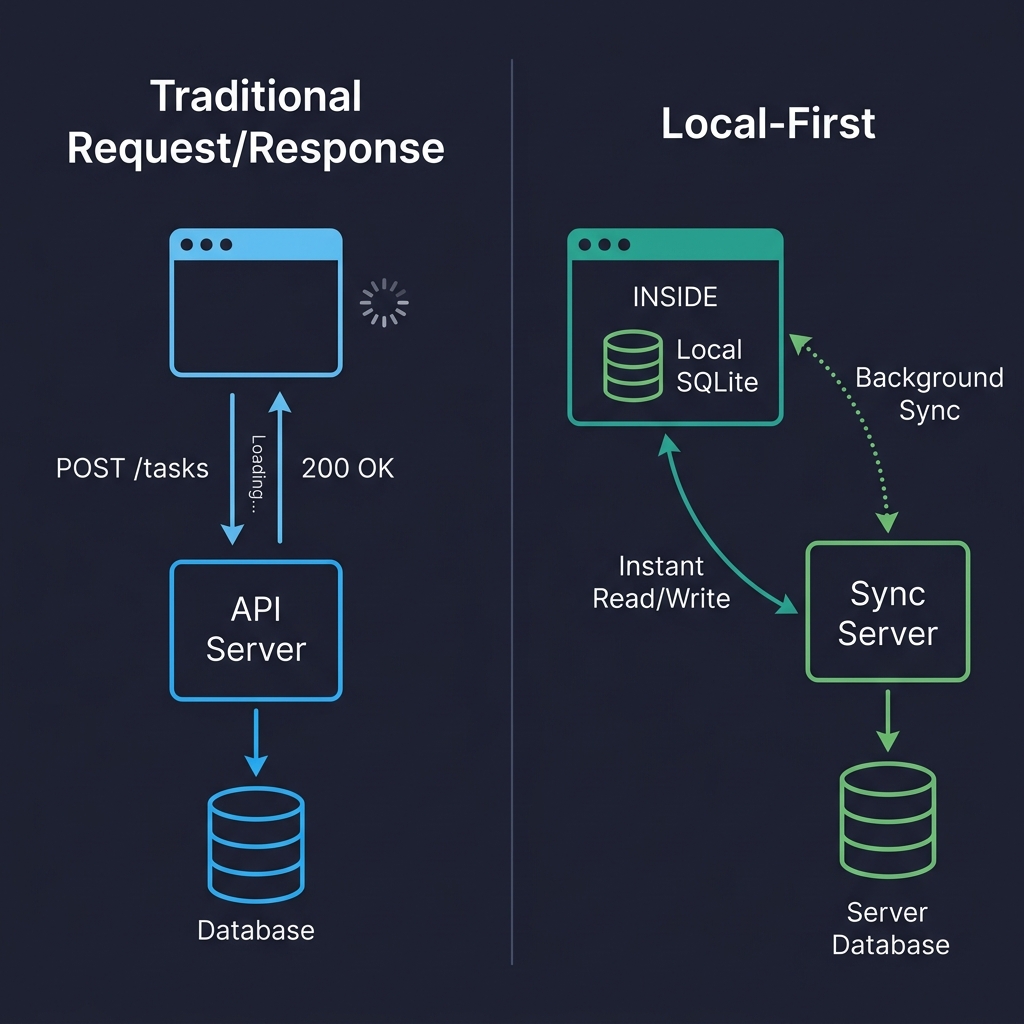
In the traditional architecture (left), every user interaction involves a round trip to the server. Click, wait, render. In the local-first architecture (right), reads and writes directly access the local database. The sync server remains, but its work happens in the background, without blocking the user. This is the fundamental difference.
Where Data Lives on the Client: Choosing the Right Storage
Forget localStorage. Its synchronous nature blocks the main thread, it has a limited storage capacity (5-10 MB), and it only stores strings. It's suitable for theme preferences, not for a database.
IndexedDB is the reliable but often unloved workhorse. It's present in every browser, it's asynchronous, it can handle hundreds of megabytes of data, but its API is notoriously cumbersome. I've only used it directly once. Now, I either use abstractions or avoid it altogether.
The real game-changer in 2026 is SQLite running in the browser via WebAssembly.
While it might sound like a novelty, it's a practical solution. SQLite compiled to WASM, persisted to the Origin Private File System (OPFS), provides a *real relational database* within the browser. It supports full SQL queries, transactions, and indexes.
OPFS is the key enabler, offering a sandboxed file system with high-performance synchronous access (in Web Workers), precisely what SQLite requires. Before OPFS, SQLite could only run in memory, with manual persistence to IndexedDB, which was slow and unreliable.
Here's a simplified example of database initialization:
In production, I encapsulate all database access within a write queue to serialize mutations. I also log every failed write to Sentry, including the sanitized SQL statement, to aid in debugging database issues within user browsers.
One crucial caveat involves Safari's OPFS implementation, which differs subtly from Chrome's. I encountered a bug where createSyncAccessHandle() would silently fail in certain iframe contexts on Safari 18, without any error or exception. The solution was to fall back to IndexedDB-backed persistence on Safari, which, while slower, at least provided functionality. (Safari 19/26 is reported to address this, but I haven't confirmed it.)
Here's a comparison of storage options:
| Storage | Good For | Watch Out For |
|---|---|---|
| IndexedDB | Broad compatibility, moderate data | Terrible DX, no SQL, verbose |
| OPFS + SQLite WASM | Relational data, complex queries, serious apps | Safari quirks, ~400KB bundle addition |
| PGlite (Postgres in WASM) | Full Postgres compatibility on client | Newer, larger bundle, still maturing |
I've also experimented with cr-sqlite, which adds CRDT column support directly to SQLite tables. While a clever idea, it felt too immature for production use when I evaluated it in