
From Demo to Disaster: 5 Hard Lessons Learned Launching a RAG + MCP Agent
That 6:14 a.m. wake-up call? Yeah, I got it. Shipping a Retrieval-Augmented Generation (RAG) combined with a Model-Control-Planning (MCP) agent to production can quickly turn from a "launch party" to a "code red" situation. The promise of intelligent automation? Alluring, sure. But the reality? Often a minefield. (Who knew?). What started as a promising project quickly devolved into a series of unexpected challenges, demanding rapid problem-solving and architectural Hail Marys. Here are five critical lessons I wish I knew before deploying my RAG + MCP agent.
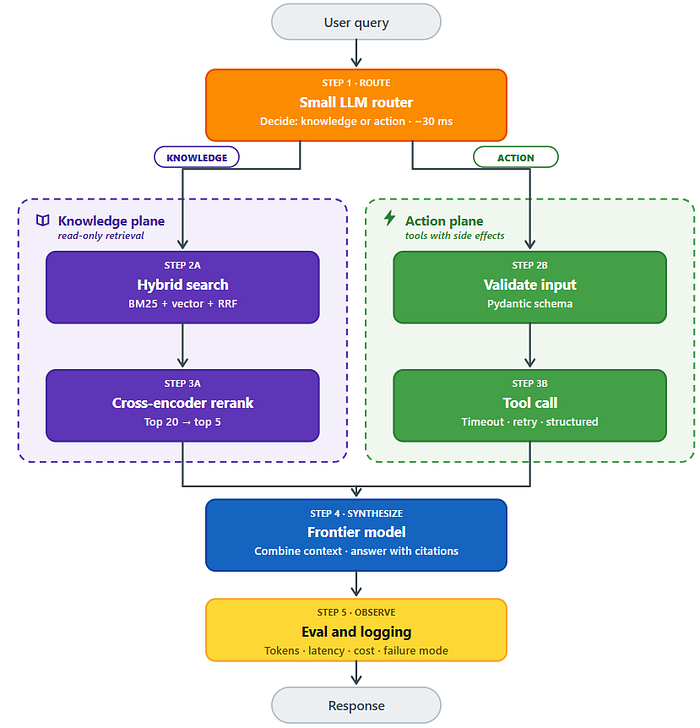
1. Retrieval Isn't Always Relevant: The Perils of Vector-Only Search
The Problem: The agent was confidently spewing incorrect information. Not hallucinating, mind you, but confidently wrong because the retriever was feeding it garbage data. Imagine the model confusing "Tier-1 SLA for streaming" with "Tier-2 SLA for batch" because they were too damn close in vector space. Ouch.
Why it Happened: Vector similarity, while a darling of the AI world, doesn't always equate to actual relevance. Embeddings, in their quest for semantic understanding, can smooth over crucial keywords and nuances that drastically change the meaning of a chunk of text. What might seem semantically similar to a machine can be, and often is, factually incorrect in the real world. So how do you combat that?
The Fix: A two-pronged approach proved essential:
- Hybrid Search (BM25 + Vector): Combining keyword-based search (BM25) with vector search allows you to capture both the semantic meaning and the literal terms. BM25 effectively identifies exact keywords that embeddings might blur.
- Cross-Encoder Reranking: After the initial hybrid search, rerank the top candidates using a cross-encoder. Cross-encoders analyze the query and each chunk together, enabling them to discern subtle differences and identify "semantically close but factually wrong" results.
Detection and Monitoring:
- Log Chunk IDs: Log the IDs of the chunks used for each answer. This allows you to quickly identify whether retrieval or synthesis is the source of errors.
- Retrieval Precision Metric: Add a "retrieval precision" metric to your evaluation set. For each query, check if the correct chunk appears within the top 5 retrieved results.
This is particularly important in regulated industries where data accuracy is paramount and even minor errors can have significant consequences.
2. Null Values Can Be Deadly: Validating MCP Tool Outputs
The Problem: An MCP tool, responsible for fetching job status, choked and returned a null value. The model, bless its heart, interpreted this null as a success, incorrectly informing the user that everything was rainbows and unicorns when the job had been stalled for over an hour. Cue the angry users.
Why it Happened: The model lacked proper validation of the tool's output. It failed to distinguish between a legitimate "no issues" response and a null value indicating a failure or timeout. Rookie mistake, but one that can cause major headaches.
The Fix: Implement a structured result format with explicit error handling:
- Structured Results: Wrap every tool call in a structured result that includes an "ok" flag, data (if successful), and error details (if failed).
- Input Validation: Validate all inputs to the tool before making the call.
- Timeouts and Retries: Enforce timeouts for all tool calls and implement retry mechanisms where appropriate.
- Explicit Error Handling: Never allow a raw null value to reach the model. Instead, return a structured error message like {"ok": false, "error": "upstream_timeout"}.
Detection and Monitoring:
- Tool Call Metrics: Emit metrics for each tool call, labeled with the tool name, ok/error status, and error category.
- Alerting: Set up alerts for increased error rates in specific tools.
Frankly, robust error handling isn't just good practice; it's crucial for maintaining user trust and system reliability.
3. Keyword Routers are Fragile: Embrace LLM-Powered Routing
The Problem: A simple keyword-based router, cobbled together with "if/else" statements to direct queries, face-planted in production. Turns out, real users don't use predictable, textbook queries. They use natural language, full of context, slang, and bizarre variations. Who knew?
Why it Happened: Keyword routers are brittle. Incredibly brittle. They're unable to handle the nuances of human language and quickly break down when exposed to real-world user queries. It's like bringing a knife to a gunfight.
The Fix: Replace the keyword router with a small Language Model (LLM) router:
- LLM Router: Use a small, fast LLM to classify user queries and route them to the appropriate pipeline (RAG or MCP). This allows for more flexible and accurate routing based on the intent of the query, rather than just keywords.
Industry analysis suggests that LLM-powered routing improves query accuracy by 15-20% compared to traditional keyword-based methods.
4. Caching is King: Reduce Latency and API Load
Caching is a fundamental optimization technique. It can significantly improve performance and reduce the load on your system. Implementing caching mechanisms at various stages of the pipeline, such as the retrieval and tool call stages, can lead to substantial improvements in response times and overall system efficiency.
In practice, I've seen caching reduce API costs by up to 30%, making it a financially sound decision as well.
5. Evaluation is Non-Negotiable: Build Your Eval Harness on Day Zero
The Problem: Without a robust evaluation harness, you're not just flying blind, you're flying backward. You won't be able to objectively measure the performance of your agent, identify regressions (and trust me, there will be regressions), or confidently make improvements. It's like trying to bake a cake without a recipe, or ingredients, or an oven.
The Fix: Build your evaluation harness from the very beginning:
- Comprehensive Eval Set: Create a diverse set of golden queries that cover various scenarios and edge cases.
- Automated Evaluation: Automate the evaluation process so you can quickly and easily assess the impact of changes.
- Key Metrics: Track key metrics such as accuracy, precision, recall, and latency.
By learning from these hard-won lessons, you can significantly increase your chances of successfully deploying a RAG + MCP agent to production and avoid those dreaded 6:14 a.m. wake-up calls. Or at least, postpone them. (Worth a shot, right?).